Authentication & Authorization: How Applications Know Who You Are and What You Can Do
A beginner-friendly guide to authentication, authorization, sessions, JWTs, cookies, OAuth, and access control.
Computer Science
Web Development
Authentication
Security
Backend
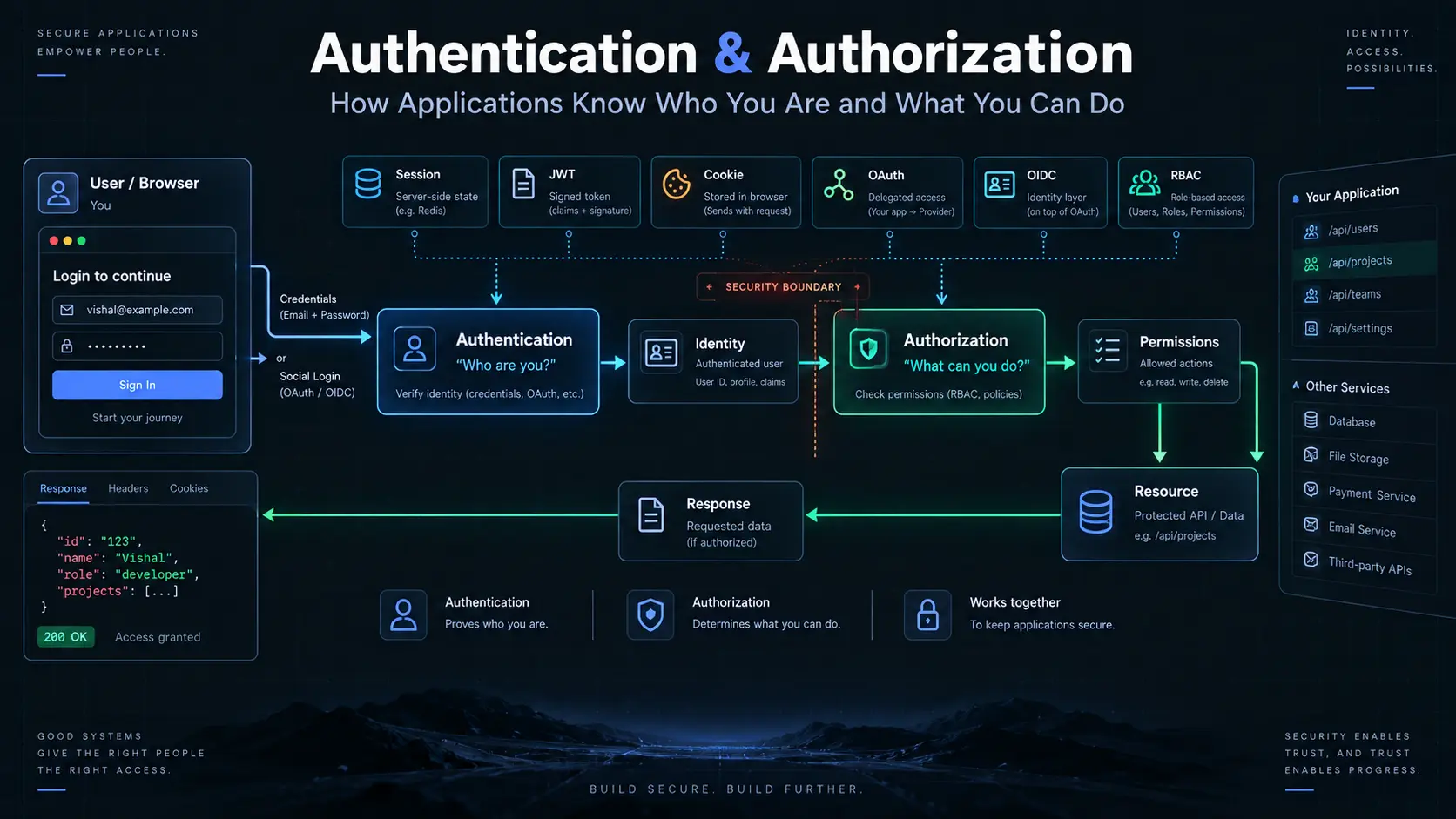
Imagine you walk into a private office.
The security guard asks:
"Who are you?"
You show your ID.
The guard checks it and lets you inside.
But then you try to enter the CEO's office.
The guard stops you:
"You are allowed inside the building, but not this room."
This simple situation explains two of the most important ideas in application security:
Authentication and Authorization.
Authentication: "Who Are You?"
Authentication is simply the process of checking who you are.
For example, when you log into a website:
Email
+
Password
   ↓
Website checks them
   ↓
You are recognized
If everything is correct, the website knows:
"This person is Vishal."
That's authentication.
It answers:
"Who are you?"
Authorization: "What Are You Allowed to Do?"
Knowing who you are isn't enough.
The application also needs to know what you're allowed to access.
For example:
You are logged in
      ↓
You can view your profile
      ↓
You can edit your profile
      ↓
But you cannot access
another user's private data
That's authorization.
It answers:
"What are you allowed to do?"
A simple way to remember it:
Authentication
      ↓
Who are you?

Authorization
      ↓
What can you do?
How Does a Website Remember You?
Here's a problem.
You log in once.
Then you click another page.
Then another.
How does the website know that all those requests are coming from the same person?
The website needs some way to remember you.
One common solution is called a session.
Sessions: The Website Remembers You
Think about getting a temporary visitor pass at an office.
When you enter:
You
 ↓
Login
 ↓
Office gives you a visitor pass
You don't have to prove your identity from scratch every time you open a door.
The website works in a similar way.
After you successfully log in:
Login
  ↓
Website creates a session
  ↓
You receive an identifier
  ↓
Browser sends it with future requests
  ↓
Website recognizes you
The website keeps information about your session.
For example:
Session ID: abc123
User: Vishal
Expires: 8:00 PM
The important part is that the website remembers the session.
What Does a Session Need?
A basic session has three important pieces:
1. Creating the Session
You successfully log in.
The website creates a session for you.
Login successful
      ↓
Create session
2. Session ID
The website gives your browser a unique identifier.
Session ID
    ↓
abc123xyz
The browser sends that identifier when making future requests.
3. Expiry
Sessions shouldn't live forever.
Eventually, they expire.
Session created
      ↓
      ↓
      ↓
Session expires
This limits how long an old session can remain useful.
Where Does the Website Keep Sessions?
The website needs somewhere to remember the session.
One common approach is keeping sessions in a database.
For example:
Database

Session ID     User
-------------------------
abc123         Vishal
xyz789         Rahul
qwe456         Priya
When your browser sends:
Session ID: abc123the server can look it up and find:
abc123 → VishalNow the website knows who made the request.
The Problem With Huge Numbers of Users
Imagine your website becomes extremely popular.
You now have millions of users.
And your application has multiple servers:
              Load Balancer
             /      |      \
            ↓       ↓       ↓
         Server A Server B Server C
A user might log in through Server A.
Their next request might reach Server C.
But Server C still needs to know about that user's session.
Now all the servers need access to the same session information.
This can introduce additional work and complexity.
For very large systems, keeping and synchronizing this shared memory can become an architectural concern.
This is one reason another approach became popular:
JWTs.
JWT: Carrying Information With the Request
JWT stands for JSON Web Token.
Instead of the server needing to remember all the information about a user's login session, the token can carry information about the user and the authorization context.
Think of it like a signed pass.
Instead of asking the security desk:
"Do you remember this person?"
the person presents a pass containing information that can be checked.
A JWT has three main parts:
Header
.
Payload
.
Signature
For example:
xxxxx.yyyyy.zzzzzThe three sections are separated by dots.
The Header
The header describes information about the token.
It can contain things such as the signing method.
You don't need to memorize the details yet.
Think of it as:
"How should this token be understood and checked?"
The Payload
The payload contains information called claims.
For example:
User ID
Role
Expiry time
Other information
A very important point:
The payload is not automatically secret.
A JWT is usually encoded, not encrypted.
So don't put passwords or other secrets inside it.
The Signature
The signature helps the receiving system determine whether the token has been changed.
Conceptually:
Header
+
Payload
+
Secret / Signing Key
      ↓
Signature
If someone changes important information inside the token, the signature check can fail.
Session vs JWT
The biggest difference is where the application keeps the important state.
With a traditional session:
Browser
   ↓
Session ID
   ↓
Server
   ↓
Session Storage
   ↓
User Information
The server looks up the session.
With a JWT:
Browser
   ↓
JWT
   ↓
Server
   ↓
Verify Token
   ↓
Read Claims
The server can verify the token without necessarily looking up a session record for every request.
That's why JWTs are often described as stateless.
But JWTs Aren't Magic
JWTs solve some problems, but they introduce others.
One major concern is token theft.
If someone gets your valid token, they may be able to use it until it expires or is otherwise invalidated.
Another challenge is revocation.
Imagine you issue a token that is valid for one hour.
Five minutes later, you discover that the account has been compromised.
How do you immediately invalidate that token?
This is one reason token lifetime, refresh strategies, storage, and revocation design matter.
So What Are Cookies?
Cookies are much simpler than they sound.
A cookie is a small piece of information that a website can ask your browser to store.
For example:
Website
   ↓
"Please remember this value."
   ↓
Browser stores cookie
Later, the browser can send that cookie back to the website.
For example:
Cookie:
session_id=abc123
This makes cookies useful for authentication.
But here's an important distinction:
Cookie and session are not the same thing.
A cookie is a way to store and send information from the browser.
A session is the server-side concept that can use a session identifier to remember a user's state.
You can think of it like:
Cookie
  ↓
Carries the identifier

Session
  ↓
Represents the remembered state
Different Ways Applications Handle Authentication
There isn't one authentication method that works everywhere.
Different situations require different approaches.
Some common approaches include:
Stateful Sessions
Stateless Tokens
API Keys
OAuth
OpenID Connect
Let's understand the big picture.
Stateful Authentication
With stateful authentication, the server keeps information about the user's login state.
Browser
   ↓
Session ID
   ↓
Server
   ↓
Session Information
This can be useful when:
- You want easy session invalidation.
- You need strong control over active sessions.
- Your application can manage shared session storage effectively.
Stateless Authentication
With stateless authentication, the server doesn't need to maintain the same kind of session record for every request.
JWTs are a common example.
Browser
   ↓
Token
   ↓
Server
   ↓
Verify
   ↓
Allow / Reject
This can be useful in systems where independently handling requests across many servers is important.
API Keys
API keys are commonly used when one application needs to communicate with another application or service.
For example:
Your Application
      ↓
API Key
      ↓
Weather Service
The service uses the key to identify and control access to the API.
API keys are generally more suited to application-to-application access than human login systems.
OAuth
Now imagine you want a website to access something from another service.
For example:
"Allow this application to access my calendar."
You don't want to give the application your calendar password.
Instead, you can use OAuth.
OAuth is primarily about delegated access.
It allows you to give an application limited access to resources without giving that application your password.
What Does Delegation Mean?
Delegation simply means:
You allow someone or something to use a resource on your behalf, but only within the permissions you give them.
Imagine giving someone a key that opens only one room.
They don't get the key to your entire house.
Similarly, an application might receive permission to:
Read your calendarwithout receiving permission to:
Delete your calendarThis is the idea of limited access.
OAuth 1.0 vs OAuth 2.0
OAuth has evolved over time.
You may encounter:
OAuth 1.0
OAuth 2.0
OAuth 2.0 is the much more common version you'll encounter in modern applications.
It provides a framework for delegated authorization using different flows depending on the situation.
Common OAuth Flows
Different situations require different ways of obtaining permission.
Some important flows include:
Authorization Code Flow
Common for applications where a user is involved.
User
 ↓
Application
 ↓
Authorization Server
 ↓
User approves
 ↓
Authorization Code
 ↓
Application
 ↓
Access Token
The application can then use the access token to access the permitted resource.
Client Credentials Flow
This is designed for machine-to-machine communication where there isn't a user sitting in front of the application.
For example:
Service A
   ↓
Service B
Service A authenticates itself and receives permission to access Service B.
Device Code Flow
Useful for devices where typing or using a traditional browser-based login is difficult.
For example:
Smart TV
Game Console
Limited-input Device
The device can show a code and ask the user to complete the authorization on another device.
Implicit Flow
You may encounter the Implicit Flow in older OAuth documentation.
It was designed for browser-based applications but is generally not the preferred approach for modern applications.
Modern systems generally favor safer approaches such as Authorization Code with appropriate protections.
OAuth and "Login With..."
You've probably seen buttons like:
Continue with Google
Continue with GitHub
Continue with Microsoft
This often involves OAuth and, when the application needs to authenticate the user, OpenID Connect (OIDC).
What Is OpenID Connect?
OAuth answers a question like:
"Can this application access this resource?"
OpenID Connect builds an identity layer on top of OAuth 2.0.
It helps answer:
"Who is this user?"
A simplified distinction:
OAuth
   ↓
Access / delegation

OpenID Connect
   ↓
User identity
This distinction is important because OAuth itself was designed primarily for delegated authorization, not as a general-purpose login protocol.
Authentication and Authorization Are Different
This is worth repeating because it's one of the most common beginner mistakes.
Imagine:
You enter a building.Authentication:
"Are you really Vishal?"
Authorization:
"Is Vishal allowed into this room?"
So:
Authentication
       ↓
Identify the person

Authorization
       ↓
Decide what they can access
You need both in most protected applications.
Role-Based Access
Now imagine an application with different types of users:
Admin
Editor
User
An admin might be able to:
Create users
Delete users
Change settings
View reports
A normal user might only be able to:
View their profile
Update their profile
The application can assign permissions based on the user's role.
This is commonly called Role-Based Access Control (RBAC).
Why Use Roles?
Without a clear system, you could end up with permission checks scattered everywhere.
For example:
if admin
    allow

if editor
    allow

if user
    deny
RBAC gives the application a structured way to define:
Role
 ↓
Permissions
 ↓
Actions
It becomes easier to understand who can do what.
Why Generic Error Messages Matter
Imagine someone tries to log in with an email that doesn't exist.
If the application responds:
"This email doesn't exist."
An attacker now knows that the email belongs to nobody.
A better response might be:
"Invalid email or password."
The same message can be used whether:
Email doesn't existor:
Password is wrongThis gives attackers less useful information.
Small details like this can improve the security of an application.
Timing Attacks
Sometimes attackers can learn information by measuring how long an operation takes.
For example, imagine an application comparing a secret value character by character.
If it stops immediately when it finds a mismatch, different inputs might take slightly different amounts of time.
An attacker could potentially use those differences to learn information.
Security-sensitive comparisons can therefore use techniques designed to make comparison time less dependent on how much of the secret matched.
This is often referred to as a constant-time comparison.
The goal is simple:
Don't accidentally reveal secrets through timing differences.
Choosing the Right Approach
There is no universal winner.
Think about the situation.
Stateful Sessions
Good when:
You have browser-based users
+
You want strong server-side control
+
You need easy session invalidation
Stateless Tokens
Useful when:
Multiple services need to verify tokens
+
You want less centralized session state
+
The architecture benefits from stateless requests
API Keys
Useful for:
Application → API
Service → Service
OAuth
Useful when:
An application needs delegated access
to another service's resources.
OpenID Connect
Useful when:
You need standardized user identity
on top of OAuth.
The Big Picture
Authentication and authorization aren't one single feature.
They're a collection of ideas working together:
                    Authentication
                          │
             "Who are you?"
                          ↓
                 Identity established
                          │
                          ↓
                    Authorization
                          │
             "What can you do?"
                          ↓
                    Permissions
Different systems can then use different ways to maintain or prove that identity:
Sessions
   │
   ├── Server remembers state
   │
JWT
   │
   ├── Token carries claims
   │
API Keys
   │
   ├── Application-to-application access
   │
OAuth
   │
   ├── Delegated access
   │
OIDC
   │
   └── User identity
Final Mental Model
If you remember only one thing, remember this:
Authentication
      ↓
"Who are you?"
      ↓
Identity

Authorization
      ↓
"What can you do?"
      ↓
Permissions
And then:
Sessions
→ Server remembers you

JWT
→ Token carries verifiable claims

Cookies
→ Browser stores and sends small pieces of information

API Keys
→ Applications identify themselves to APIs

OAuth
→ You delegate limited access

OIDC
→ Applications can establish user identity

RBAC
→ Roles determine permissions
The goal isn't to memorize every authentication technology.
The goal is to understand what problem each one is solving.