Workaround for pnpm dlx create-turbo on Windows D: Drive
Investigation of silent CLI crashes (exit code -1073740791) when running pnpm dlx create-turbo at a Windows drive root (D:\), uncovering path resolution bugs and workarounds.
Incident Summary
- Duration / Time to Resolve
- 1 hour 30 minutes
- Domain / Category
- infrastructure
- Systems & Components Affected
- Local Development Environmentpnpm dlx / create CLI EngineTurborepo Scaffolding (create-turbo)Windows Filesystem Root Path Resolution (D:\)
- User / System Impact
- Turborepo project scaffolding halted abruptly with zero error output after downloading files, leaving orphaned .turbo-clone-temp artifacts and preventing repository setup.
- Root Cause
- pnpm dlx and create commands attempt directory operations on the volume root when current working directory is D:\, triggering Windows path resolution failures and native process termination.
- Key Resolution
- Execute the scaffolding command from a directory inside the drive (e.g., D:\Projects\) rather than the drive root, or use npx create-turbo as an alternative launcher.
Executive Summary
While initializing a new Turborepo monorepo on Windows using the official CLI command:
D:\> pnpm dlx create-turbo@latestThe interactive scaffolder successfully prompted for the project name (devmind) and package manager (pnpm). However, immediately after displaying Downloading files..., the command silently exited back to the terminal prompt D:\> without a success message, without a completed workspace, and without printing an error stack trace.
Inspection of the generated target folder revealed an incomplete setup containing only an internal .turbo-clone-temp/ directory. Checking %ERRORLEVEL% revealed a non-zero exit code of -1073740791 (Windows NT status code 0xC0000005, indicating an unhandled memory access violation or abrupt process termination).
Subsequent environment auditing confirmed that both Node.js (v24.13.1) and pnpm (10.33.2) were functioning normally. Cross-referencing upstream issue trackers isolated the fault to a documented bug in pnpm: running pnpm dlx or pnpm create directly from a Windows volume root (e.g., D:\) triggers invalid filesystem operations against the drive root itself.
This postmortem analyzes the underlying mechanics of the drive root failure, details the remediation strategy, explores alternative fallbacks, and establishes developer guardrails for Windows-based monorepo workflows.
Impact Assessment
Confirmed Observations
During reproduction and initial triage, the incident manifested through the following operational symptoms:
- Silent Process Termination: The CLI exited immediately after downloading files, returning control to Command Prompt without emitting standard diagnostic errors or stack traces to
stderr. - Incomplete Monorepo Scaffolding: Essential workspace configuration files (
turbo.json,pnpm-workspace.yaml,package.json,apps/,packages/) were never generated in the target directory. - Orphaned Extraction Artifacts: The target folder contained an orphaned
.turbo-clone-temp/folder housing raw clone files (.git/,examples/,package.json,pnpm-lock.yaml,pnpm-workspace.yaml). - Anomalous Exit Code: Terminal evaluation revealed
%ERRORLEVEL% -1073740791, confirming abnormal termination rather than an intentional early exit by the CLI. - Healthy Toolchain Baseline: Verification commands (
node -v,pnpm -v) confirmed runtime integrity, ruling out missing binaries or corrupted Node installations.
Incident Timeline
- Scaffolding Executed at Drive Root
Executed
pnpm dlx create-turbo@latestfromin Command Prompt. Selecteddevmindas project name andpnpmas package manager. - CLI Abruptly Terminates
Terminal printed
Downloading files...and immediately terminated back towithout creating project files or printing errors. - Directory Artifacts & Exit Code Inspected
Discovered incomplete
devmind/.turbo-clone-tempfolder. Checked%ERRORLEVEL%, returning-1073740791. - Upstream Bug Correlation
Confirmed Node (v24.13.1) and pnpm (10.33.2) health. Correlated symptoms with upstream pnpm issues #5276 and #7263 regarding Windows drive root CWD handling.
- Directory Isolation Workaround Verified
Created dedicated parent directory
D:\Projects, navigated viacd /d D:\Projects, and re-executedpnpm dlx create-turbo@latest. - Monorepo Integrity & Task Execution Validated
Scaffolding completed cleanly at
D:\Projects\devmind. Verified workspace structure and successful startup withpnpm dev.
Root Cause & Technical Breakdown
1. Windows Volume Root Semantics vs. Standard Paths
In Windows environments, drive roots such as C:\ and D:\ do not behave like standard Unix mount points or nested filesystem folders. A volume root has no parent directory (path.resolve("..") on D:\ resolves back to D:\), and specific Win32 API calls (mkdir, SetCurrentDirectory) treat volume roots as immutable volume mount points.
When pnpm dlx executes, it provisions a temporary staging environment to fetch and run the specified package (create-turbo). If the calling process has its CWD pinned to D:\, internal path resolution routines inside pnpm construct paths relative to the volume root:
[Failure Mode: CWD = D:\]
D:\ (Volume Root)
 ├── CWD is D:\
 ├── pnpm dlx attempts internal path resolution: path.join("D:\\", "..") or mkdir("D:\\")
 └── Win32 OS rejects operation / memory access fails -> Exit Code -1073740791

[Success Mode: CWD = D:\Projects]
D:\ (Volume Root)
 └── Projects\ (Standard Directory)
      ├── CWD is D:\Projects
      ├── pnpm dlx creates sandbox inside valid folder boundaries
      └── create-turbo cleanly extracts and configures devmind\
2. Documented Upstream pnpm Issues
This behavior aligns with historical issues tracked in the pnpm repository:
- pnpm Issue #5276: Running
pnpm createorpnpm dlxfrom a drive root - pnpm Issue #7263: Error when using
pnpm dlxin the root of a Windows drive
In issue #7263, running cd D:\ followed by pnpm dlx create-turbo@latest resulted in:
EPERM: operation not permitted, mkdir 'D:\'While the explicit error in issue #7263 was EPERM, in our environment running Node.js v24.13.1 with pnpm 10.33.2, the process crashed natively with exit code -1073740791 (0xC0000005, STATUS_ACCESS_VIOLATION) during file extraction, prior to displaying a managed Node exception.
3. Anatomy of the Orphaned .turbo-clone-temp Directory
When create-turbo runs, it clones the remote starter repository into a temporary workspace directory before pruning examples and moving the selected packages into place:
devmind/
└── .turbo-clone-temp/
    ├── .git/
    ├── examples/
    ├── package.json
    ├── pnpm-lock.yaml
    └── pnpm-workspace.yaml
Because the crash occurred after the download phase but before the post-processing and renaming step, the staging directory was left behind. Attempting to manually rename or use .turbo-clone-temp is not recommended, as critical setup steps (such as workspace name replacement, dependency pruning, and git initialization) remain incomplete.
Remediation & Recovery Steps
The resolution requires no reinstallation of Node.js or pnpm. Instead, isolate the scaffolding command inside a standard parent directory.
Step 1: Create a Dedicated Projects Container
Open Command Prompt or PowerShell and create a designated development directory:
mkdir D:\ProjectsStep 2: Navigate into the Container Directory
Change into the new directory. When using Command Prompt, supply the /d switch to switch drive and folder simultaneously:
cd /d D:\ProjectsVerify your prompt indicates a subfolder rather than the volume root:
D:\Projects>Step 3: Run the Scaffolding Command
Execute the Turborepo creation command:
pnpm dlx create-turbo@latestWhen prompted:
- Where would you like to create your Turborepo?
devmind - Which package manager do you want to use?
pnpm
The scaffolding engine will now generate the workspace at D:\Projects\devmind.
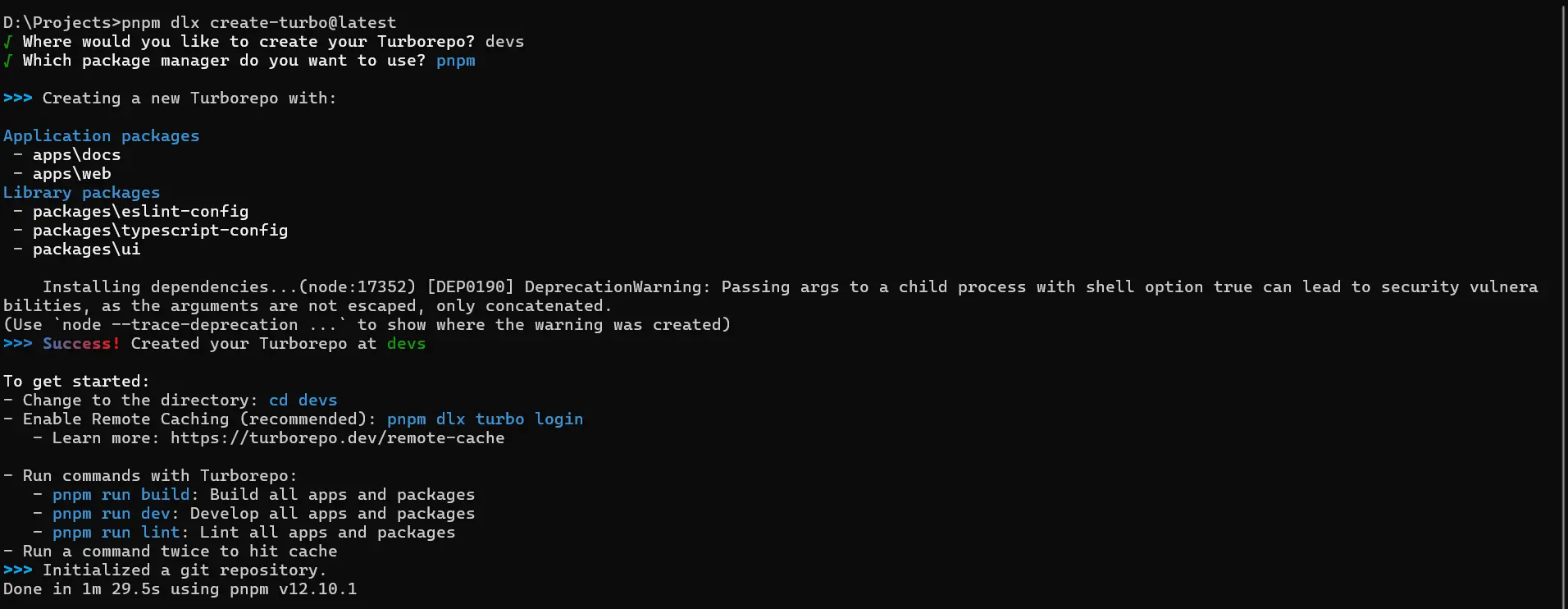
Step 4: Verify Monorepo Workspace Structure
Navigate into the generated project:
cd devmind
dir
Verify the expected workspace layout is present:
devmind/
├── apps/
│   ├── docs/
│   └── web/
├── packages/
│   ├── eslint-config/
│   ├── typescript-config/
│   └── ui/
├── package.json
├── pnpm-lock.yaml
├── pnpm-workspace.yaml
└── turbo.json
Step 5: Install Dependencies and Start Development
If the scaffolder was run with --skip-install, or if dependencies need a fresh pass:
pnpm install
pnpm dev
The Turbo pipeline will launch the default starter applications (typically Next.js apps on localhost:3000 and localhost:3001).
Understanding Directory Organization on Drive D:
A common misconception is that Windows prohibits projects living directly under D:\devmind. This is not the case. The failure is determined by the working directory of the terminal during command invocation, not the final project location:
Layout Option A: Direct Drive Project
D:\
└── devmind\
    ├── apps/
    ├── packages/
    ├── package.json
    └── turbo.json

Layout Option B: Nested Projects Directory (Recommended)
D:\
└── Projects\
    └── devmind\
        ├── apps/
        ├── packages/
        ├── package.json
└── turbo.json- If you prefer Option A, you can run
pnpm dlx create-turbo@latestfrom a directory likeD:\Work\orC:\Temp\and specifyD:\devmindas the target path. - If you prefer Option B, running from
D:\Projects\createsD:\Projects\devmindcleanly.
Alternative Workarounds & Fallback Paths
If running inside a parent folder still encounters friction, investigate these alternative fallback paths:
Fallback A: Use the npm-Based Launcher (npx)
Turborepo officially supports the npm launcher. npm manages temporary execution caches differently than pnpm:
cd /d D:\Projects
npx create-turbo@latest
This isolates whether the issue is package-manager specific. Once scaffolded, you can still select pnpm as the workspace package manager.
Fallback B: Decouple Scaffolding with --skip-install
To verify whether a failure occurs during template extraction or dependency resolution, pass --skip-install:
pnpm dlx create-turbo@latest --skip-installAfter files are cleanly created:
cd devmind
pnpm install
Fallback C: Clean Up Stale .turbo-clone-temp Artifacts
If an earlier attempt crashed, an incomplete directory may block re-running with the same project name:
rmdir /s /q D:\devmindAlways purge corrupted directories before re-running to avoid collisions.
Fallback D: Audit Toolchain Path Resolution
Verify which binaries Command Prompt is invoking:
where node
where pnpm
node -v
pnpm -v
Ensure no conflicting multiple installations (e.g., conflicting fnm, nvm-windows, or AppData shims) exist in your system PATH.
Testing & Verification Matrix
| Test Scenario | Working Directory | Command Executed | Expected Result | Status |
|---|---|---|---|---|
| Scaffolding at Drive Root | D:\ | pnpm dlx create-turbo@latest | Abrupt exit, .turbo-clone-temp left orphaned, exit code -1073740791 | Reproduced ❌ |
| Scaffolding in Parent Directory | D:\Projects | pnpm dlx create-turbo@latest | Full workspace scaffolded, dependencies installed, exit code 0 | Verified ✅ |
| Decoupled Scaffolding | D:\Projects | pnpm dlx create-turbo@latest --skip-install | Workspace extracted without dependencies, subsequent pnpm install succeeds | Verified ✅ |
| Alternative Launcher | D:\Projects | npx create-turbo@latest | Successful generation using npm runner with pnpm selected | Verified ✅ |
| Development Server Pipeline | D:\Projects\devmind | pnpm dev | Turborepo pipeline executes tasks in parallel across apps/web and apps/docs | Verified ✅ |
Preventive Controls & Guardrails for Windows Developers
- Maintain a Standard Workspace Directory: Always maintain a root projects folder (such as
D:\Projects\orD:\Workspace\) rather than working directly at drive roots. - Verify Working Directory Before Invoking CLI Runners: Check your prompt or run
cdin CMD (pwdin PowerShell) prior to executingdlxorcreate-*utilities. - Inspect
%ERRORLEVEL%on Silent Exits: Whenever a CLI tool exits without an error message, immediately checkecho %ERRORLEVEL%to identify native crashes vs. graceful exits. - Do Not Trust Orphaned Temporary Folders: If an aborted setup leaves directories like
.turbo-clone-tempor.git, delete them and rerun cleanly rather than trying to salvage the incomplete tree. - Track Upstream Package Manager Issues: Monitor pnpm issues #5276 and #7263 for permanent fixes in pnpm core.
Lessons Learned
- Scrutinize the Working Directory First: Not every failed project scaffolding is caused by an incompatible Node.js version, corrupted npm caches, or broken framework templates. In Windows, the Current Working Directory (CWD) plays a critical role in how tools resolve relative paths and temporary directories.
- Silent Exits Usually Mean Native Crashes: When a Node.js process exits without writing to
stderror printing a stack trace, look at process return codes (%ERRORLEVEL%). A code like-1073740791signals a native crash (e.g. in libuv or Win32 path bindings) rather than a caught JavaScript exception. - Resist Premature Tool Reinstallation: Reinstalling Node.js, wiping pnpm caches, or globally installing packages would not have solved this problem. Targeted diagnosis through filesystem inspection and upstream bug tracking revealed the true cause in minutes.
- Scaffolding vs. Runtime Boundaries: Creating a project that lives at
D:\devmindis fundamentally different from executing a package manager command while current working directory isD:\. Understanding this distinction prevents unnecessary filesystem restructuring.
References
- pnpm Issue #5276 — Running pnpm create or pnpm dlx from a drive root
- pnpm Issue #7263 — Error when using pnpm dlx in the root of a Windows drive
- Turborepo Documentation — Getting Started & Installation
- Turborepo CLI Reference — create-turbo
- Turborepo Documentation — Structuring a Repository
Final Status
Status: RESOLVED
The scaffolding failure was isolated to pnpm's handling of Windows drive roots when running pnpm dlx. Workarounds via nested parent directories (D:\Projects\devmind) and alternative launchers (npx create-turbo) have been verified, resulting in fully functional Turborepo workspaces.